Install it. Download for macOS, Windows or Linux. The builds are not code-signed yet. On a Mac, right-click the app and choose Open the first time. On Windows, choose More info then Run anyway.
Press Get started. The app connects to the XRP Ledger. The top bar reads ONLINE when it is live.
Pick a view.Executive shows the eight key screens. Analyst shows every tool. Switch any time at the top of the sidebar.
Jump anywhere. Press Ctrl/⌘+K and type a screen, a wallet or a command.
NOSHASHI only reads the ledger. It never asks for a private key or seed phrase, and it never signs anything.
Your first check
Find out whether a payment can go ahead, before anyone signs it.
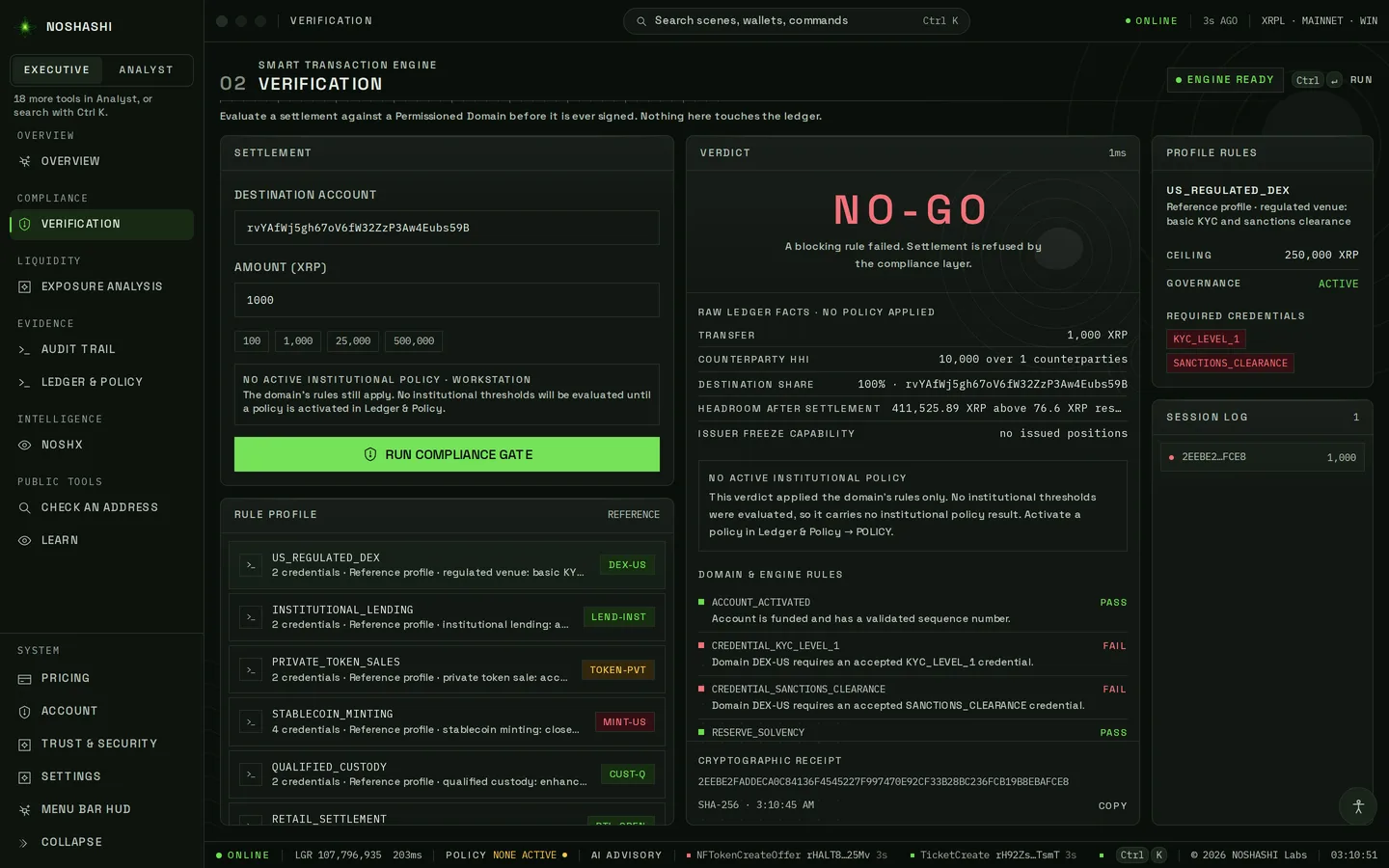
Open Verification in the sidebar.
Paste the account you would pay into Destination account.
Enter the amount in XRP, or tap 100, 1,000, 25,000 or 500,000.
Pick a rule profile under Rule profile. Each one lists the credentials it requires.
Press Run compliance gate.
Live on XRPL mainnet · ledger 107,796,935 · 21 Oct 2026
GO
Every blocking rule passed.
HOLD
Blocking rules passed, but an advisory rule failed. Someone should sign it off.
NO-GO
A blocking rule failed. Do not send it.
Under the verdict, each rule shows Pass or Fail with the reason. The cryptographic receipt (SHA-256) proves which facts and rules produced the result. Every run is kept in the Session log.
Overview
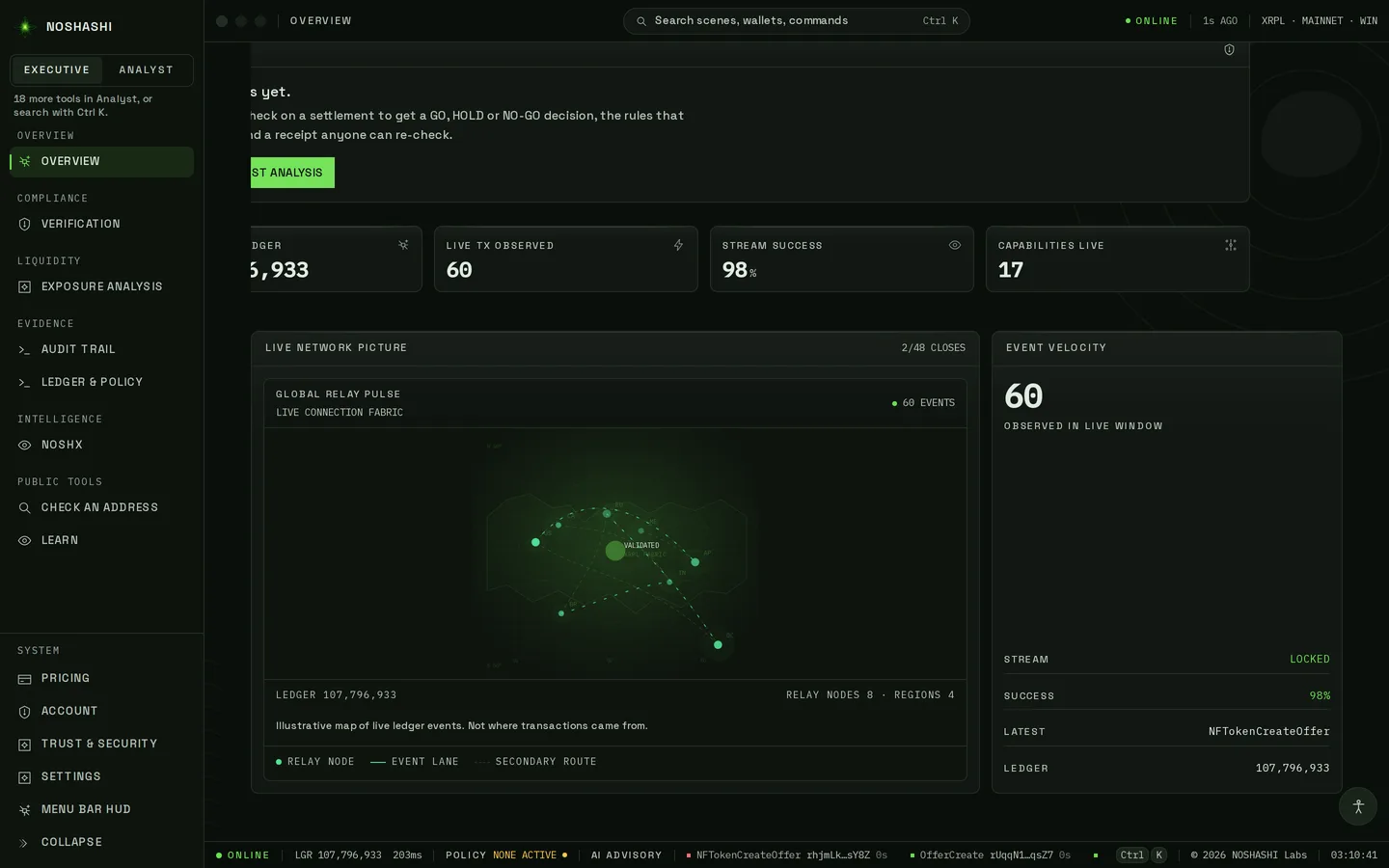
Where you start, and the live state of the ledger.
Overview
Free
What NOSHASHI checks, and the ledger it is reading right now.
Check the top bar says ONLINE and shows the latest ledger.
Read the three cards: can it move, can you sell it, can you prove it. The middle one is a live order book.
Use Run a gate check, Open the audit trail or Ask the agent to jump straight in.
Live on XRPL mainnet · ledger 107,796,933 · 21 Oct 2026
Mission Control
Free
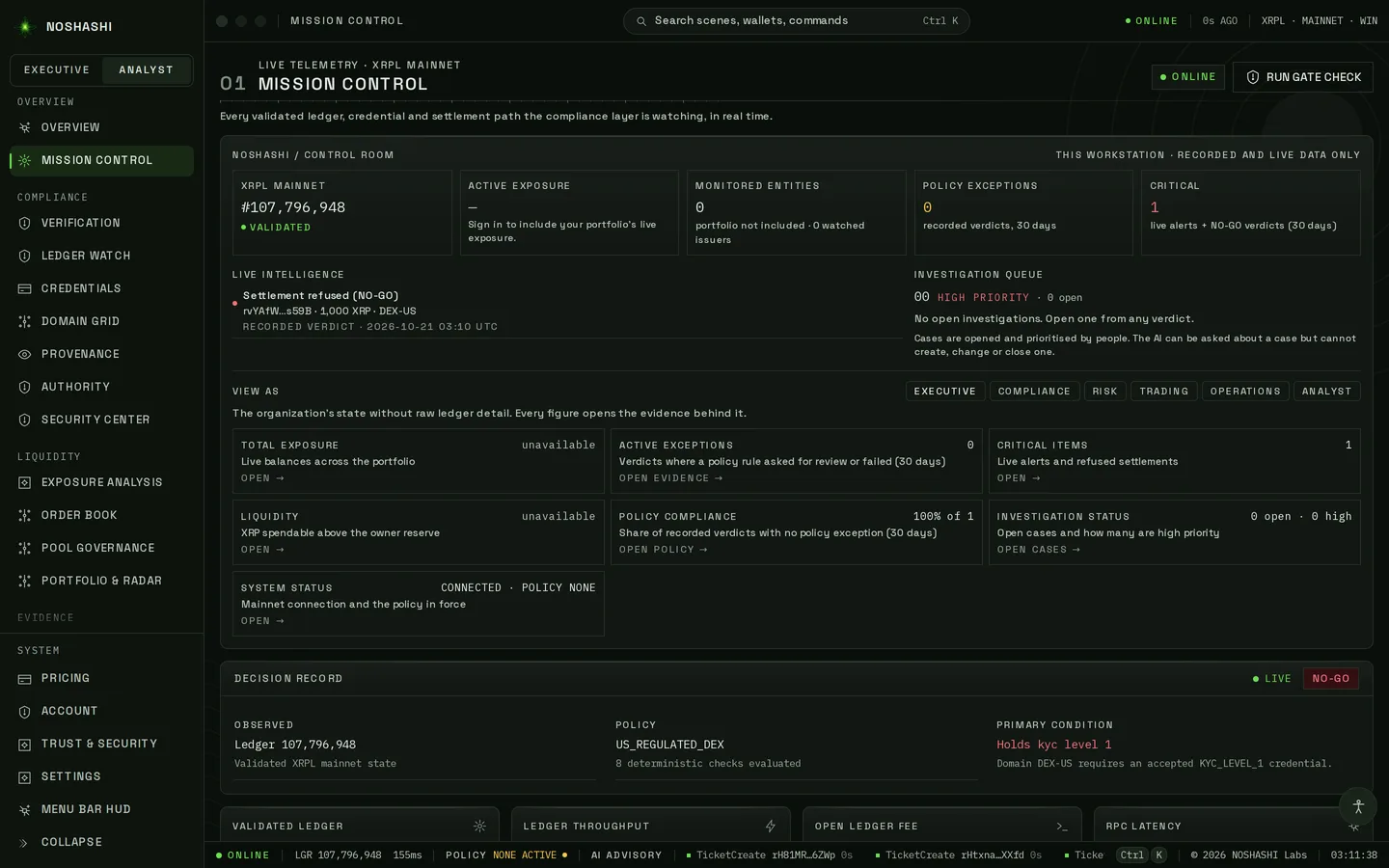
Every validated ledger as it closes, through the lens of your role.
Pick a lens at the top: Executive, Compliance, Risk, Trading or Operations.
Watch ledgers, credentials and settlement paths update as each ledger closes.
Press Run gate check to test a payment from here.
Live on XRPL mainnet · ledger 107,796,948 · 21 Oct 2026
Compliance
Can this payment or asset move under your rules?
Verification
Free
GO, HOLD or NO-GO for a payment, before anyone signs it.
Paste the destination account and enter an amount (or tap 100, 1,000, 25,000 or 500,000).
Pick a rule profile, for example US_REGULATED_DEX.
Press Run compliance gate (Ctrl/⌘+Enter). Read the verdict, each rule's pass or fail, and the receipt.
Live on XRPL mainnet · ledger 107,796,935 · 21 Oct 2026
Ledger Watch
Enterprise
Screen deposits before you credit them.
Add your deposit addresses, each with a label.
Every incoming payment is judged: what really arrived, whether the token is genuine, phishing dust, and who funded the sender up to three hops back.
Receive the results as signed webhooks and a feed.
Credentials
Free
Which on-ledger credentials (XLS-70) an account holds.
Paste a counterparty address, and the issuer's if you know it.
Press Read.
See each credential, who issued it and whether it is still valid. Switch between Grid and Table.
Domain Grid
Free
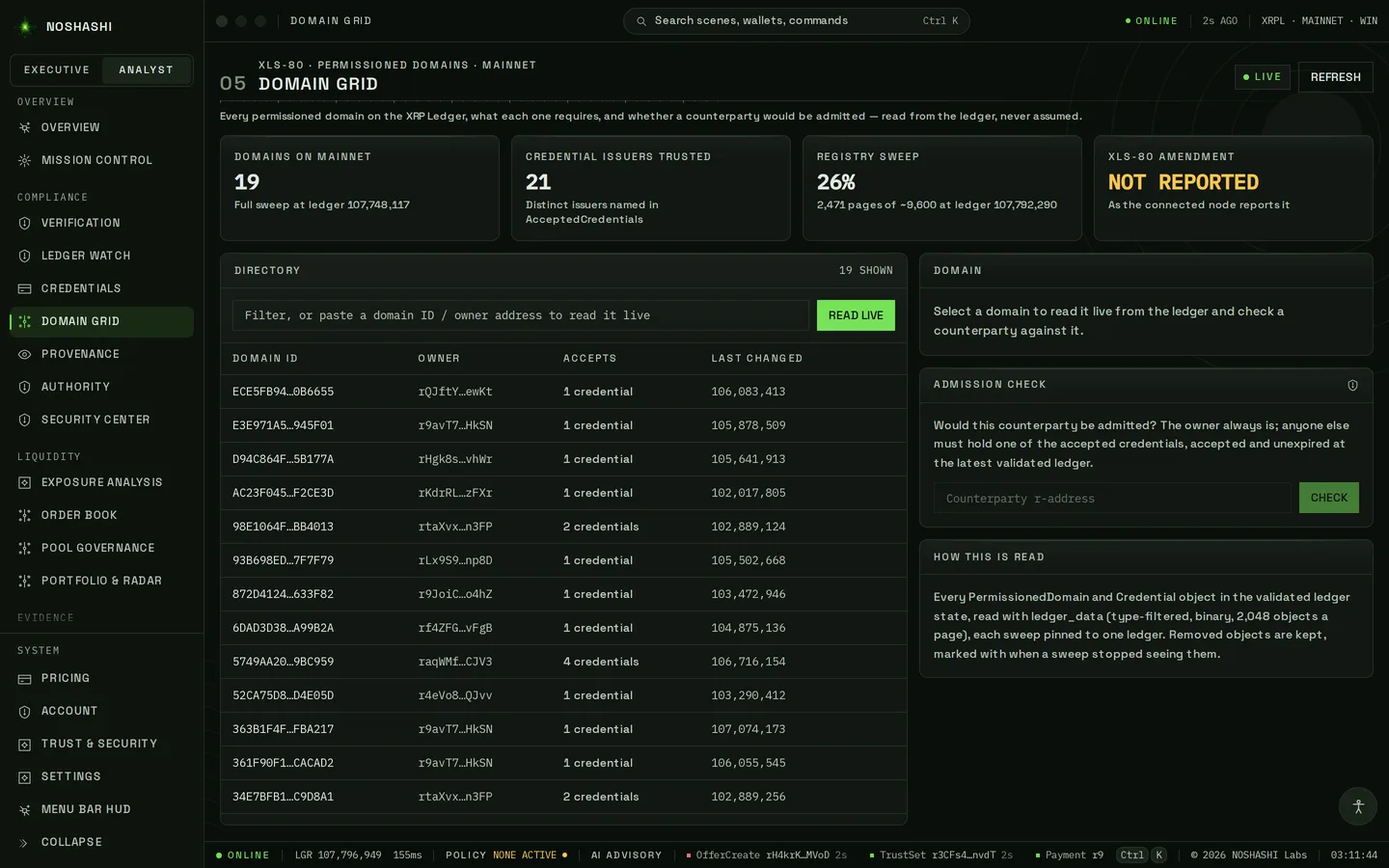
Every permissioned domain (XLS-80) on mainnet, and who qualifies.
Browse the list, or paste a domain ID or owner address and press Read live.
Open a domain to see the credentials it requires.
Paste a counterparty and press Check to see whether it would be admitted.
Live on XRPL mainnet · ledger 107,796,949 · 21 Oct 2026
Provenance
Pro
How old an account is and who funded it.
Paste the account (r…).
Read when it was created and who sent its first XRP.
Follow the funding chain as far as the node can prove it.
Authority
Pro
What an asset's issuer can still do to it.
Paste the issuer (r…).
Read freeze, clawback and signing powers, and how concentrated the holdings are.
Keep the digest: anyone can re-check the same reading later.
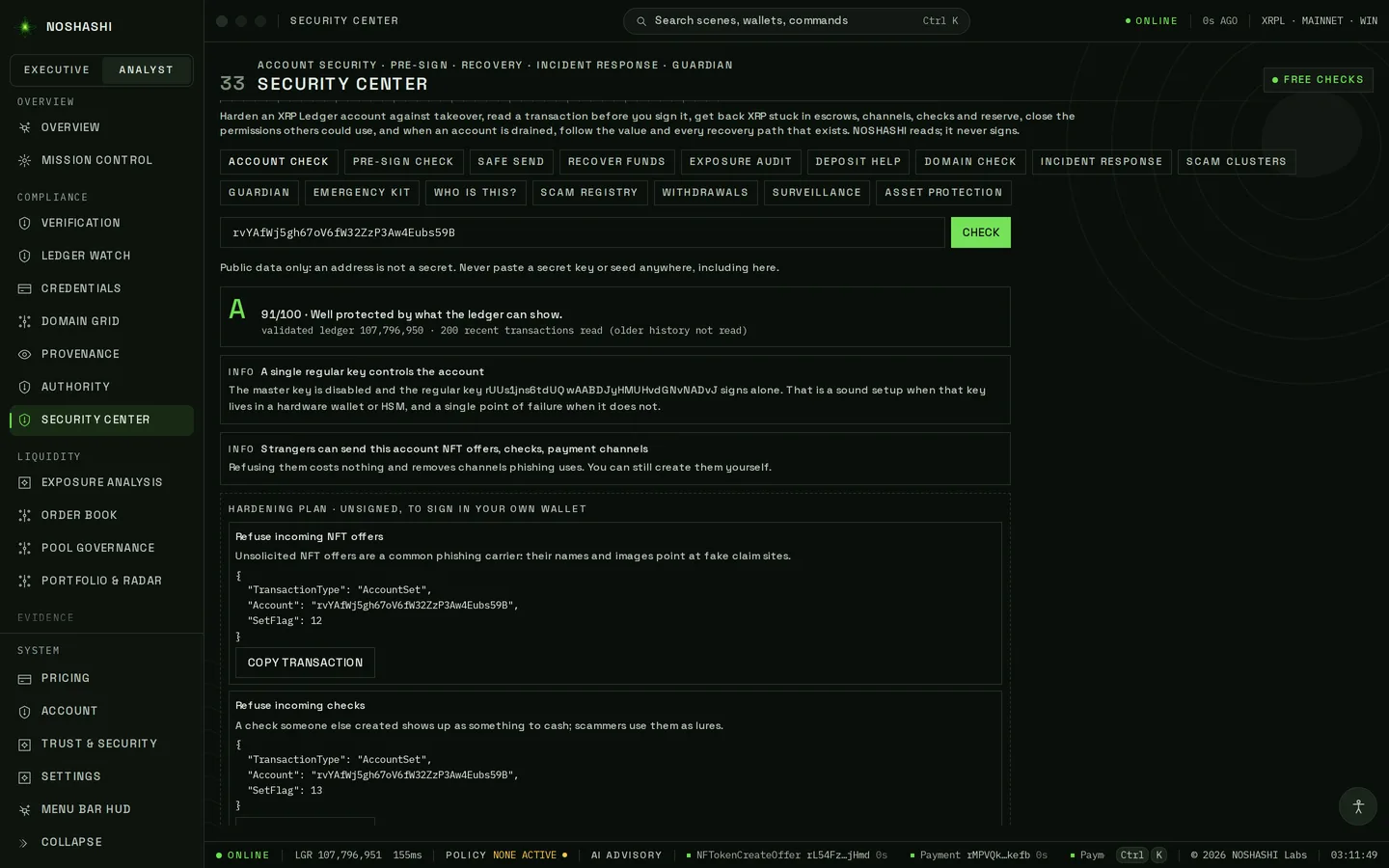
Security Center
Free
Protect an account, check who you are paying, and recover from a theft.
Pick a tool from the tabs along the top. Start with Account check: paste your own address and press Check.
Read the grade and each finding in plain English. Fixes come as unsigned transactions you copy and sign in your own wallet.
Before paying someone, use Pre-sign check or Safe send. If an account was drained, use Recover funds or Incident response. Tabs that need a paid plan say so.
Live on XRPL mainnet · ledger 107,796,951 · 21 Oct 2026
Liquidity
Is there real depth to buy or sell?
Exposure Analysis
Pro
Freeze rights, Travel Rule scope and counterparty concentration.
Load a wallet.
See which issuers could freeze what it holds.
See which payments fall under the Travel Rule, and where exposure is concentrated.
Order Book
Pro
How much of the quoted depth can actually fill.
Enter a currency code (for example USD) and its issuer.
Compare quoted against can fill on each side.
Offers whose owners no longer hold the asset are not counted.
Pool Governance
Pro
Who controls an AMM pool's trading fee.
Paste the AMM's account (r…).
See each fee vote and the share of liquidity behind it.
See who holds the auction slot, and its discount, right now.
Portfolio & Radar
Pro
Many wallets, one rule set, failures first.
Add wallets with a label, for example Treasury · hot wallet.
Each one is checked against the same rules.
Failures are listed first, so you know where to look.
Evidence
Can you prove what happened?
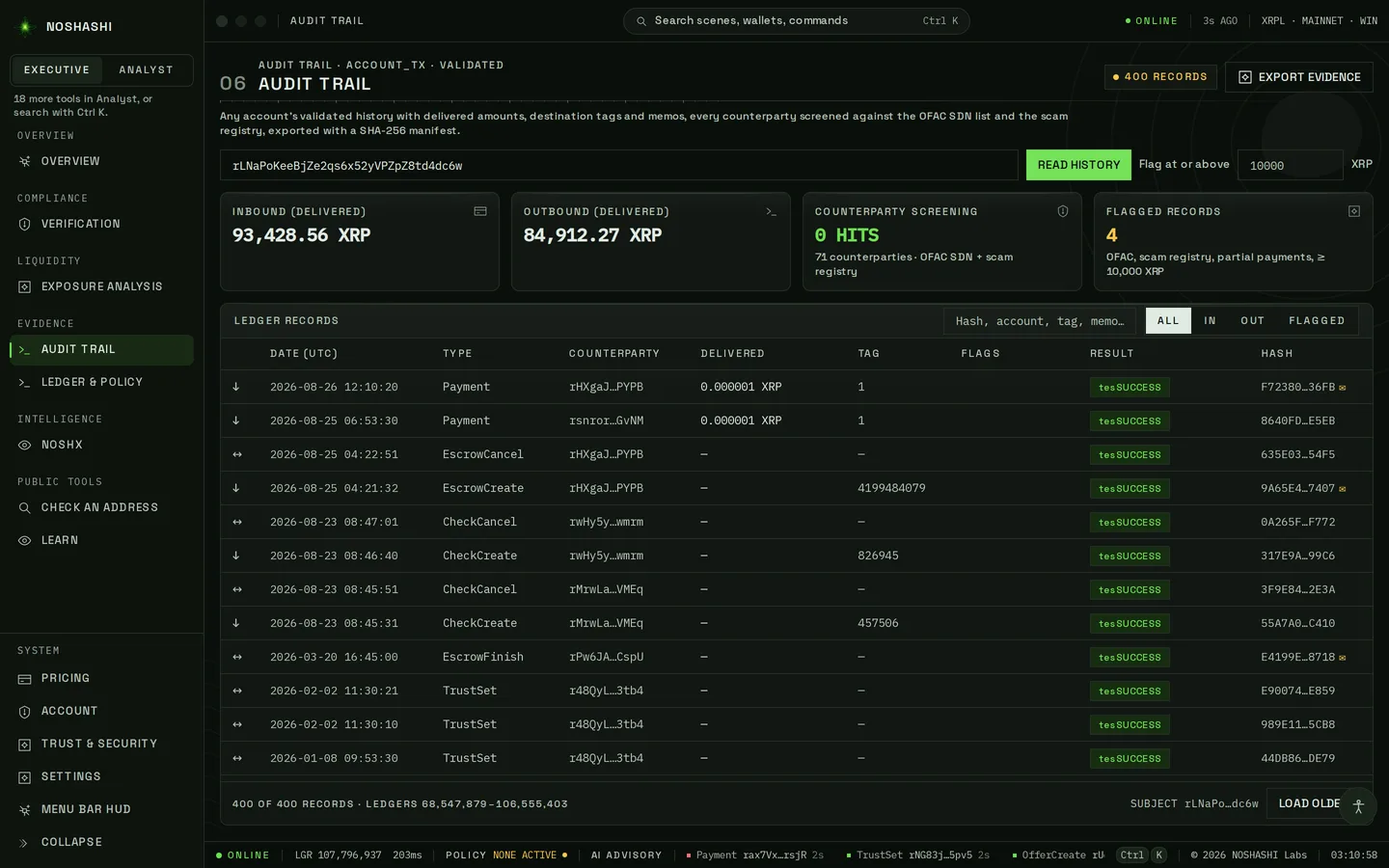
Audit Trail
Free
An account's validated history, with what each payment really delivered.
Paste the account and press Read history. Set the Flag at or above amount if you need one.
Filter by All, In, Out or Flagged, or search by hash, tag or memo.
Press Export evidence for a file with a SHA-256 manifest.
Live on XRPL mainnet · ledger 107,796,937 · 21 Oct 2026
Ledger & Policy
Pro
Every verdict you have run, your policy, and a signed export.
Write or activate your institution's policy.
Every verdict is kept on this device with the rules that produced it.
Export a signed record an examiner can verify.
Settlement
Pro
What a transaction actually delivered, not what it asked for.
Paste the transaction hash (64 characters).
Compare the requested amount with the delivered amount.
Partial payments are called out, so you never credit the wrong figure.
Issuers & treasury
Who controls a treasury, and who holds your tokens?
Control Surface
Pro
Who can move a treasury.
Paste the treasury account.
See its signers and the quorum it needs, and whether the master key is on.
See how much of the balance is locked and cannot be spent.
Issuance
Institutional
Who holds an issuer's tokens.
Paste the issuer.
See how concentrated holdings are, plus dormant lines and freezes.
Review its enforcement history.
Passport
Enterprise
A signed, portable record of an asset's posture.
Enter the issuer.
Get one signed record: authority, freeze rights, concentration and eligibility.
Share it. Any counterparty can verify it without re-running the checks.
Intelligence
Ask questions in plain English.
NOSHX
Free
An assistant that reads the live ledger to answer you. Advisory only.
Type a question, paste a transaction hash, or tap a suggested question.
Read the answer and the ledger reads it is based on.
It runs on your device by default. You can choose another model under Change runtime.
Ledger Garden
Pro
Follow the chain from issuer to asset to holder to transaction.
Paste an address or a transaction hash.
Expand each branch. Every one is read from validated ledgers.
Hand any point to NOSHX to ask about it.
Public tools
Free checks anyone can run.
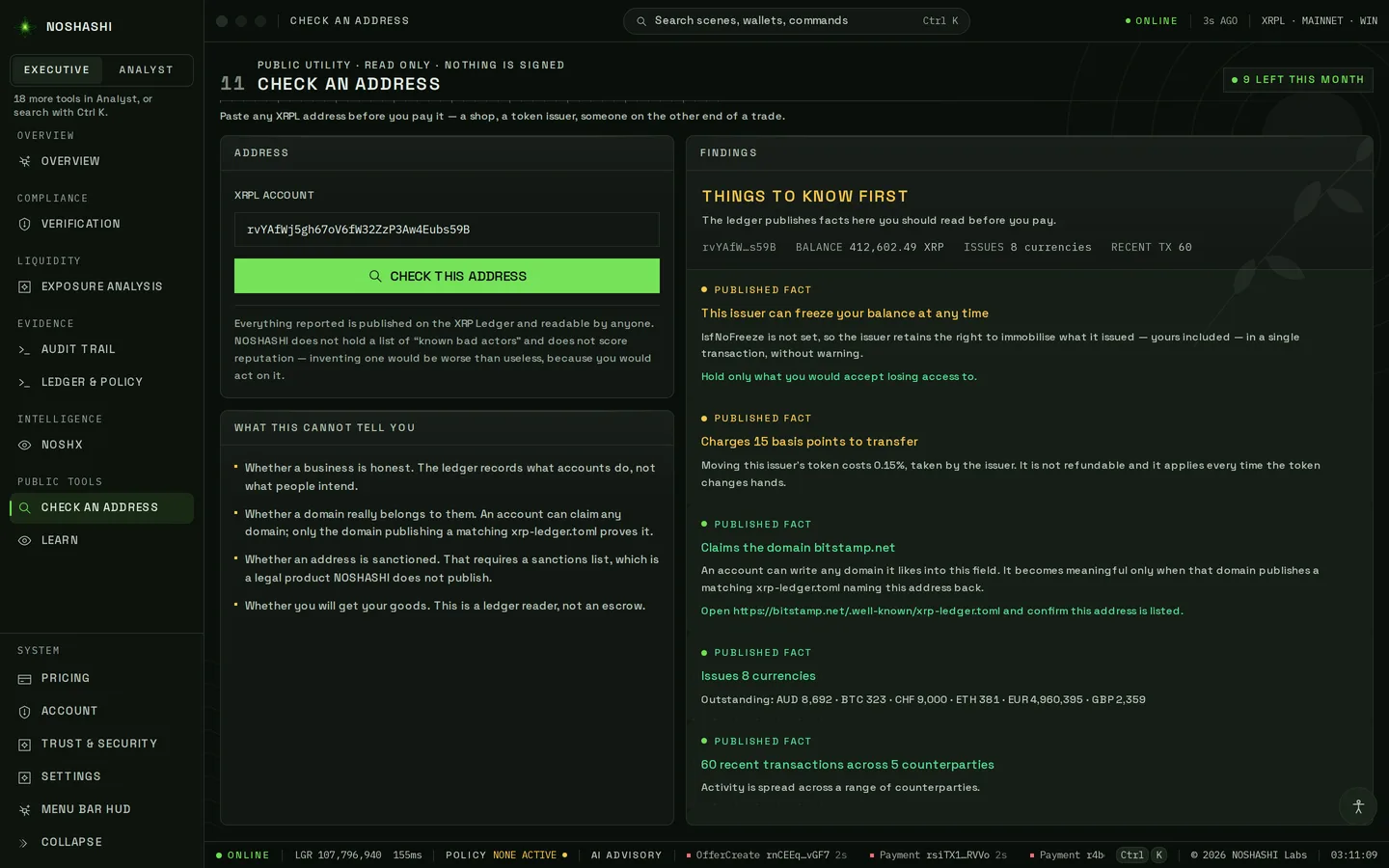
Check an Address
Free
What the ledger publishes about an account before you pay it.
Paste the address and press Check this address.
Read Things to know first: freeze rights, transfer fees and the domain it claims.
Free accounts get 10 checks a month.
Live on XRPL mainnet · ledger 107,796,940 · 21 Oct 2026
Inbox
Free
What strangers have sent an account, and whether those tokens are real.
Paste the account and press Read claims.
See each unsolicited offer and whether the token exists at all.
Never act on a claim the ledger cannot back.
Token Rights
Free
What an NFT's issuer can still do to it after you own it.
Paste the NFT's ID (64 characters).
Press Read token rights.
See whether the issuer can burn it, whether it can be resold, and the issuer's cut of each sale.
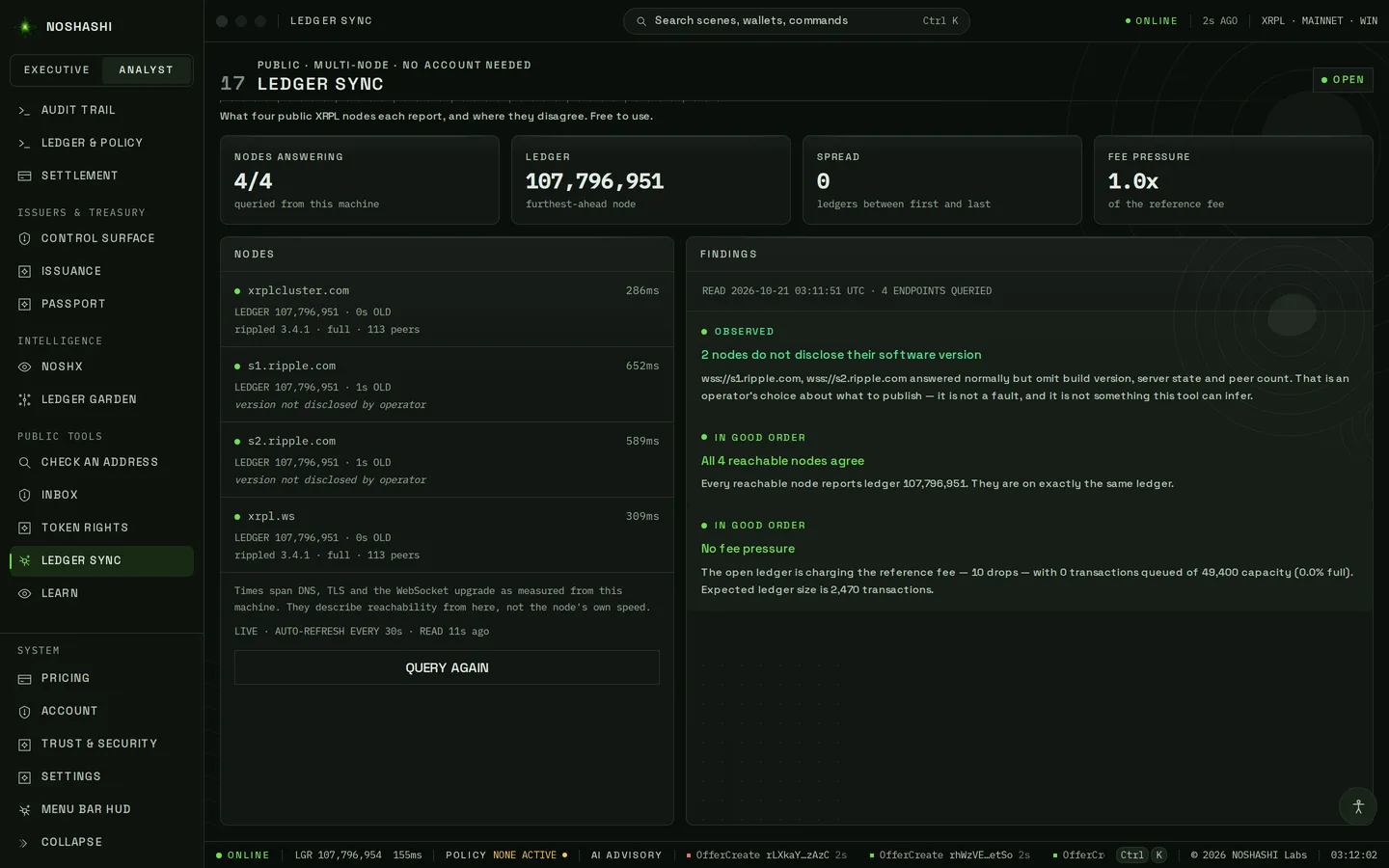
Ledger Sync
Free
What four public nodes each report, and where they disagree.
Open the screen. Nothing to enter.
Compare each node's latest ledger and timing.
A node that lags is shown, so you know which reading to trust.
Live on XRPL mainnet · ledger 107,796,954 · 21 Oct 2026
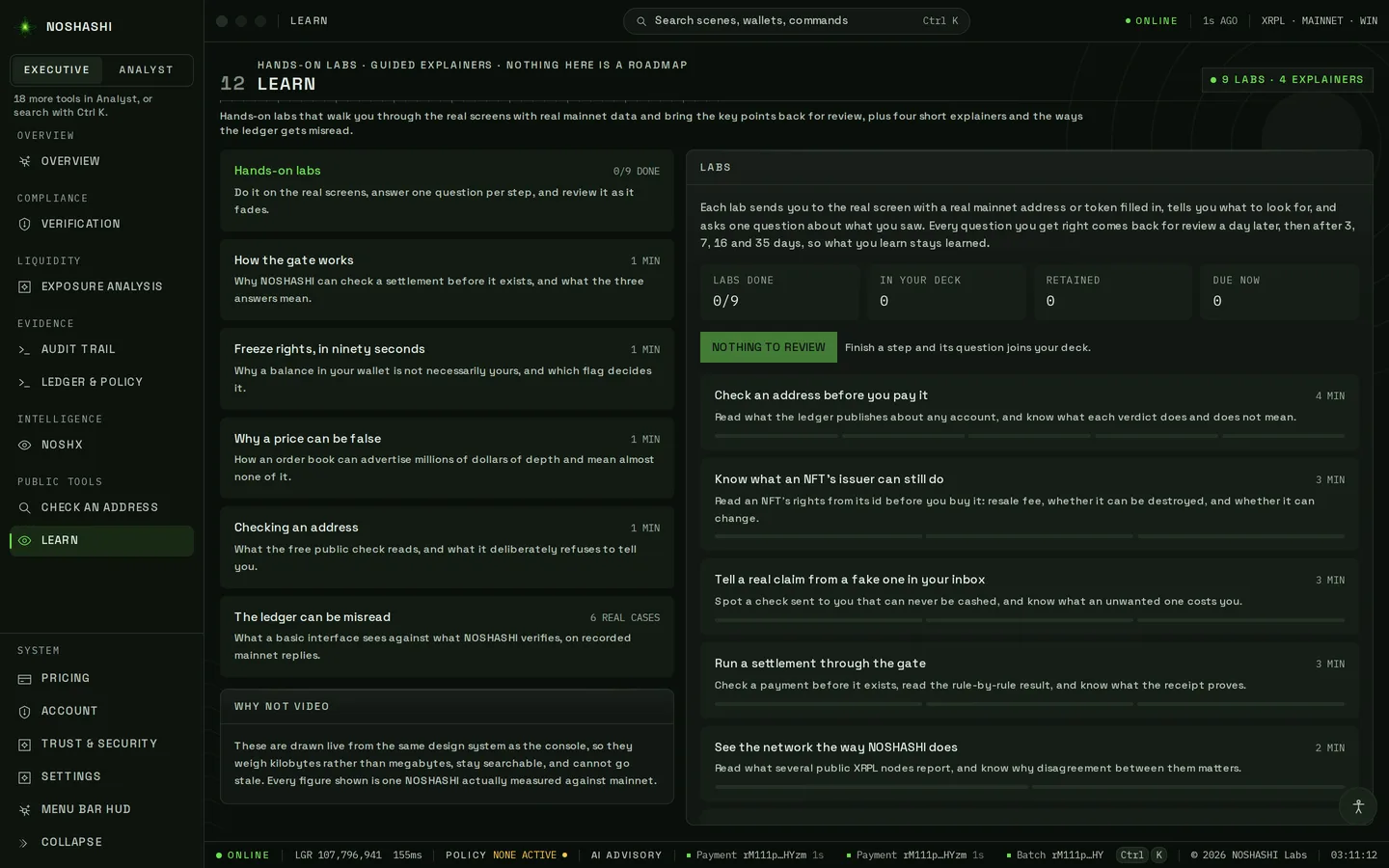
Learn
Free
Hands-on labs and short explainers.
Pick a lab. Each one walks you through a real screen with real mainnet data.
Each right answer comes back for a short review after 1, 3, 7, 16 and 35 days, so it sticks.
Watch the explainers for the ideas behind the checks.
Live on XRPL mainnet · ledger 107,796,941 · 21 Oct 2026
Your account
Plans, sign-in, security and settings.
Pricing
Free
Plans, checkout and credits.
Compare Free, Pro, Institutional and Enterprise.
Press Get Pro to subscribe. Checkout opens on Stripe in your browser.
Buy credits for automated API checks.
Account
Free
Your subscription, two-factor sign-in and API keys.
The app works without an account.
Sign in to carry a subscription, portfolios and API keys.
Turn on two-factor authentication here.
Trust & Security
Free
What NOSHASHI reads, what it never does, and where your data goes.
Read each claim, for example that it never signs or broadcasts.
Each one says how it is enforced and tested.
Settings
Free
Appearance, accessibility and the desktop app.
Choose dark, light or system theme, and reduced motion.
Set the wallet you want to watch.
Turn on the menu bar HUD (Ctrl/⌘+Shift+X).
Shortcuts
Ctrl/⌘+K
Search screens, wallets and commands
Ctrl/⌘+Enter
Run the compliance gate on Verification
Ctrl/⌘+1…9
Jump to a screen
Ctrl/⌘+R
Re-read the ledger
Ctrl/⌘+Shift+X
Show or hide the menu bar HUD
Questions
Do I need a wallet, a key or an account?
No. The app reads public ledger data. It never asks for a private key or seed phrase and never signs. An account is only needed to carry a paid plan, portfolios or API keys.
What does a screen marked Pro, Institutional or Enterprise do if I am on Free?
It shows what it does and offers Sign in or See plans. Nothing is hidden behind a fake preview. Prices are on the pricing page.
The top bar says DEGRADED or RECONNECTING.
DEGRADED means one public node is behind the others. It usually clears within a few ledgers. RECONNECTING means the link dropped, and nothing is shown as live until it is back. Press Ctrl/⌘+R to re-read.
Where is my data kept?
Verdicts, policies and settings stay on your device. The Trust & Security screen lists exactly what is read and where anything goes.
I am stuck.
Open NOSHX and use the Support tab, or contact us. The Learn screen has hands-on labs for each part of the app.